How do I read and update a brief?
A brief shows its summary and frozen data for one month. Its owner can rename it, refresh it with newer data or put a generated brief on a schedule.
1 video · 8 sec in all · 2 written guides
Video 1 of 1 · 8 sec
Open a saved brief
Captions are in the video. The steps and the full narration are below.
Step by step
Before you start. Your briefs are in Insights Library, under Saved.
- On Saved, click a brief's title.
- At the top, read the version label, such as v1 · Oct 2026, and the Data frozen as of date.
- Scroll down for the Summary, then the Frozen data table.
What you see. The rows stay as they were when the brief was saved. A refresh adds a new version instead of changing this one.
Tip. The owner can rename a brief with the pencil next to its title. The data does not change.
Read the narration
On Saved, click a brief's title. The top shows its version and frozen date. The Summary follows.
Screens from this video
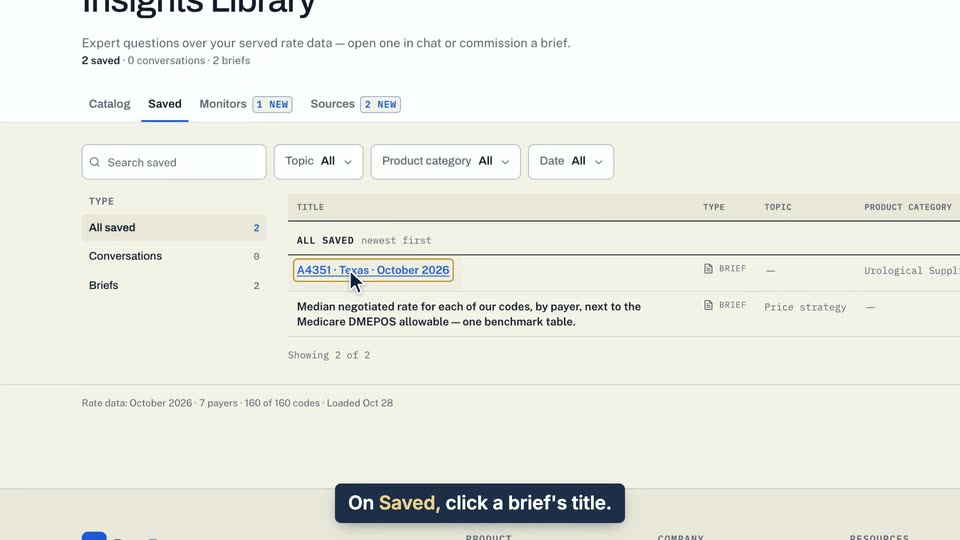
01 On Saved, click a brief's title. 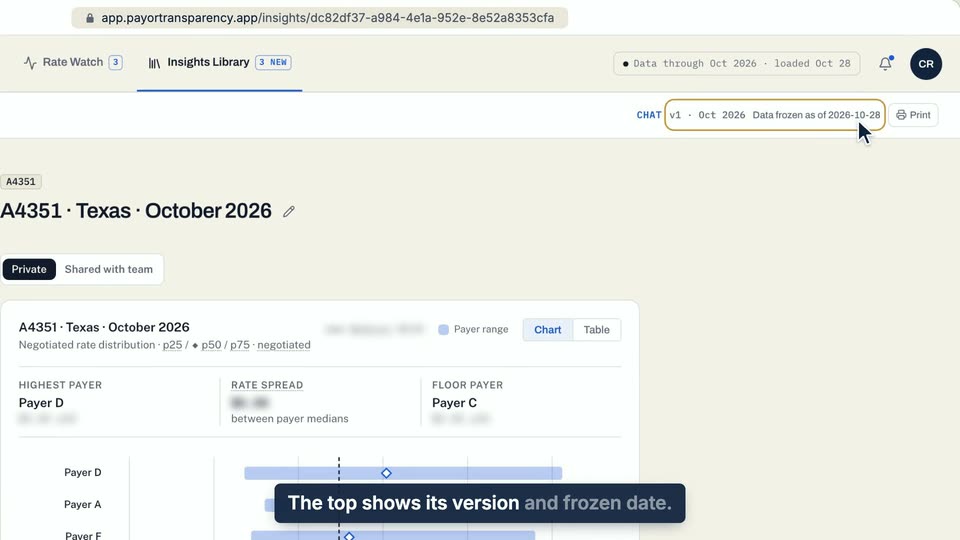
02 The top shows its version and frozen date. 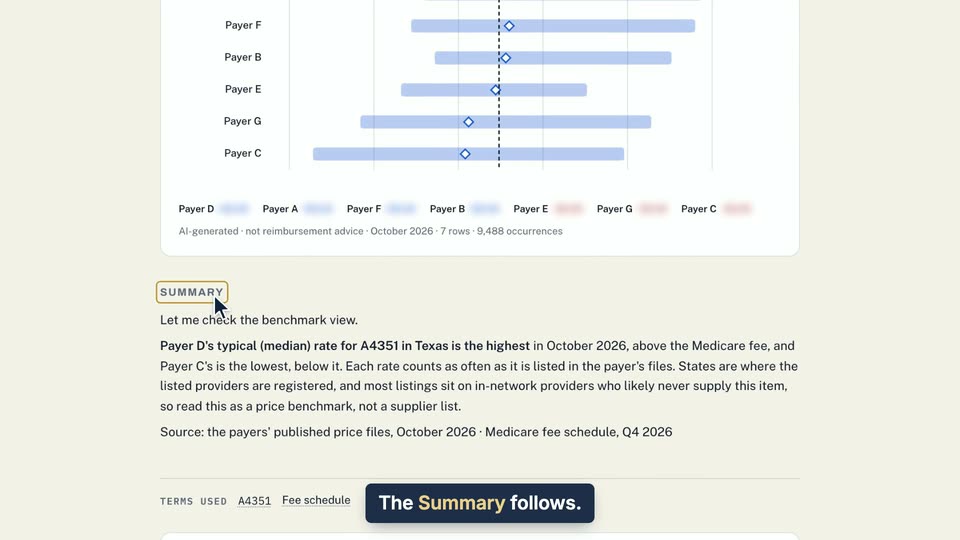
03 The Summary follows.
- Use case
- How do I read and update a brief?
- Feature
- Brief page
- Task
- Open a saved brief
Written guide
What each part of a brief means
Step by step
Before you start. A brief is a saved analysis, and each version keeps the rows it was built from frozen as they were saved. Each section shows only when it has content, so a brief saved from Chat shows fewer of them.
- At the top, the version label, such as v1 · Oct 2026, and Data frozen as of with a date tell you which saved copy of the data you are reading. The label beside them, such as Chat, News or a topic like Geo watch, says where the brief came from.
- TL;DR is the short answer. Summary is the written analysis. A brief saved from Chat keeps the answer as its Summary and has no other written sections.
- Business Implications says what the result means for the business. Each line carries a value driver tag, such as Revenue Growth or Working Capital.
- What to Do Next lists numbered steps the brief suggests. Terms used lists the terms and codes it mentions. Point at one to see what it means.
- The Frozen data table holds the rows the brief was built from. Its caption names the version, the data month and the row count.
- If the brief was built from a query, click How was this calculated? to see it, with Copy SQL, the view, the period and the payers.
What you see. The written sections are AI-generated. A line reading AI-generated · not reimbursement advice sits under the chart or the Summary.
Tip. There is no way to delete a brief. If you own it, choose Private to hide it from your team.
- Use case
- How do I read and update a brief?
- Feature
- Brief page
- Task
- What each part of a brief means
Written guide
Refresh a brief
Step by step
Before you start. Refresh with latest data sits at the right end of the toolbar along the bottom of a brief. Only the brief's owner sees it, and only on a brief whose query can run again.
- Open a brief you own, from Insights Library under Saved.
- If a newer month has loaded, a note under the title says New data available and names the month.
- Click Refresh with latest data. It reads Refreshing… while the query runs again on the newest month.
- The result is saved as a new version, and the page switches to it.
- If nothing newer has loaded, a note beside the button says the brief is already on the newest month, and nothing changes. If the newest month has no rows for the query, the note says so and the current version stays.
What you see. Older versions stay readable. When a brief has more than one version, click the version label at the top, such as v1 · Oct 2026, and pick one. The newest is marked latest.
Tip. A refresh keeps the written sections word for word, so they still describe the earlier month. Only the rows, the chart and the query details come from the new month.
- Use case
- How do I read and update a brief?
- Feature
- Refresh with latest data and versions
- Task
- Refresh a brief